Enhanced Picking Process
Introduction
We are pleased to announce a significant update to the Warehouse Management System (WMS) that will improve the order assignment and picking processes for all users.
This update introduces new pick tabs in the secondary navigation panel for all customers, providing a clearer, more organized interface that enhances efficiency and accuracy.
Key Benefits
- Clearer Process Management: The introduction of distinct tabs for different stages of order processing provides a more organized and transparent workflow.
- Improved Efficiency: By separating orders into unassigned and assigned categories (or ready for pool and pool created categories), users can more easily manage their workload, reducing the time spent searching for and assigning orders.
- Enhanced Tracking: With the new tabs, tracking the progress of orders and pools becomes more straightforward, leading to fewer errors and better overall management of the picking process.
For Normal Order Flow:
Previous Configuration:
Users had only one tab, 'Pick,' to assign orders to pickers.
What’s New:
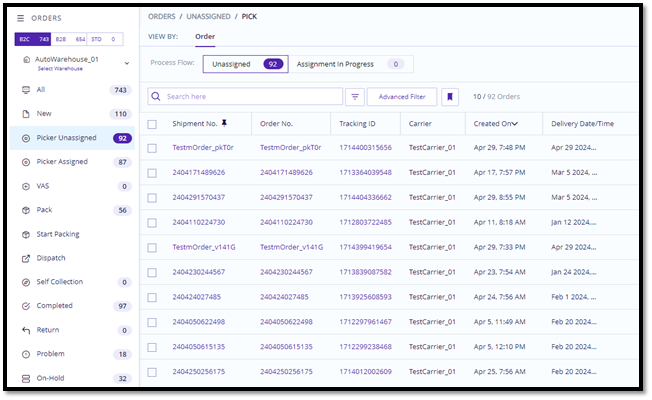
With the new configuration, users will see two distinct tabs in the secondary panel:
- Picker Unassigned: This tab displays all orders that are yet to be assigned to pickers, as well as those currently in the process of assignment. This provides users with a clear view of orders that need attention.
- Picker Assigned: This tab contains orders that have been assigned to pickers, including those that are partially picked or require re-picking.
For Pick Pool Flow:
Previous Configuration:
There was a single 'Pick' tab to create and assign order pools to pickers.
What’s New:
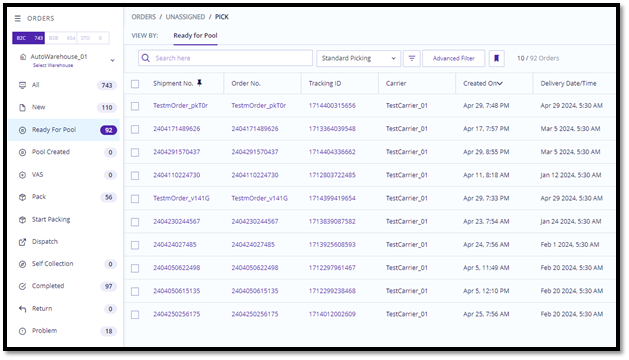
With the new configuration, users will see two distinct tabs in the secondary panel:
- Ready for Pool: Orders that are ready to be grouped into pools are listed under the ‘Ready for Pool’ tab, providing a clear overview of available orders for pooling.
- Pool Created: Once orders are grouped into pools, they are moved to the 'Pool Created' tab. Here, users can manage and track the progress of each pool, ensuring that all pooled orders are handled correctly and efficiently.